






Chinese words
for beginners
1,000 words and 482 phrases



Learn Chinese words right from your lock screen. Every day wrd shows a new word with its English translation and examples. No lessons to schedule.
downloadtap the word
to see its definition
and two more examples




2,983 words and 1,472 phrases, beginner to advanced, all with translations
泛指所有的人,男女老幼都包括在内
一个人或事物用来被叫的名称
家族的名字,放在名字前面;也用作动词,表示叫某个姓
有自己土地和人民的大地方,比如中国、日本
人口很多、建筑很多的地方
某个位置或区域
自己住的地方;也泛指家人、家庭
一起生活的家人组成的单位
孩子对父亲的常用称呼
孩子对母亲的常用称呼
比自己大的男兄弟
同父母中比自己年龄大的女兄弟
比自己小的男兄弟
同父母中比自己年龄小的女兄弟
父母的男孩
父母的女孩
关系好、常常来往的人
在同一个学校或班里学习的人
教学生学习的人
在学校学习的人
给病人看病和治疗的人
在医院照顾病人的工作人员
负责管理工作的人
公司的主人或管理者
在同一个地方工作的人
来到某个地方的人,也可以指顾客
年纪小的人
成年的男性
成年的女性
对男人的礼貌称呼
对年轻女性的礼貌称呼,多用于服务场合。
住在附近的人
人们说话和交流用的话,比如中文、英语
中国人说和写的语言
很多国家使用的一种语言
语言里表示一定意思的小单位,比如“你好”里的“你”
由词组成、表达完整意思的话
需要回答或解决的事情
对问题的回答
写着文字、可以阅读的东西
用来写字的小册子
帮助人查词和意思的书
每天或每周出版、写新闻的纸
可以写字和画画的笔
用来擦掉铅笔字的小东西
老师让学生课后完成的学习任务
学校里学习的内容或上课时间
学生学习、老师教学的地方
学校里一起上课的学生组
学生上课的房间
高中毕业后去读书的地方,在那里学习专业知识,拿到学位
公司或单位里用来工作、处理事务的房间
很多人一起做生意或提供服务的商业机构,有自己的名字和团队
卖东西给顾客的地方,可以是大的也可以是小的
卖很多种日常用品的大商店,可以自己拿着篮子选东西
很多摊位集中在一起的地方,可以买菜、买水果或各种日常东西
可以点菜吃饭的地方,通常有服务员来点单
提供饭菜的地方,可以是酒店里的餐厅,也可以是独立的餐馆
可以喝咖啡、茶,坐着聊天或工作休息的地方,通常很舒适
有医生和护士工作、给病人看病和治病的地方
可以存钱、取钱、换钱、办银行卡等金融服务的地方
可以寄信、寄包裹和办理邮政业务的地方
公共交通工具停靠、让人上下车的地方,比如公共汽车站或火车站
飞机起飞和降落的地方,旅客在这里登机或等人
旅行时付钱住宿的地方,提供床、洗澡间等基本服务
供大家免费休闲的公共绿地,可以散步、锻炼、带孩子玩
可以免费看书、借书,需要保持安静的公共学习场所
专门放映电影给观众看的地方,有大屏幕和环绕声音
上厕所和洗手的地方,在公共场所一般有男女分开的洗手间
由多个楼层组成的建筑物,也可以用来说某个楼层
房间或建筑的出入口,可以开关,用来进出或分隔空间
墙上透光通风的开口,通常装有玻璃,可以开关
有平面的家具,可以放东西、吃饭、写作或工作用
供人坐的家具,通常有四条腿和靠背
供人躺下睡觉和休息的家具,通常放在卧室里
房子里用墙隔开的一个独立空间,比如卧室、客厅等
专门用来做饭、烧菜的房间,有灶台和储存食物的空间
家里用来接待客人、聊天和休息的主要公共房间
用来洗澡的房间,里面有淋浴或浴缸,通常和洗手间在一起
可以播放节目、新闻和电影的屏幕设备,通常放在客厅里
用来处理信息、工作、学习和上网的电子设备
可以随身携带、用来打电话、发信息和上网的小型电子设备
用来远距离语音通话的设备,也可以指一次通话
用数字表示的编号,比如电话号码、房间号或身份证号
用相机或手机拍下来的图像,记录真实的人、事或景物
用植物纤维做成的薄材料,可以写字、画画、包东西
用来写字或画画的工具,有钢笔、圆珠笔、铅笔等不同种类
用来装东西、可以提着或背着随身携带的袋子或容器
较大的方形容器,用来装物品、托运行李或收纳东西
穿在身上用来保暖、遮体和装扮的东西,有很多种类和款式
穿在腰部以下、包住两条腿的衣物
穿在腰部以下、下摆宽松的衣物,女性常穿,有长有短
穿在脚上保护脚的东西,有运动鞋、皮鞋、拖鞋等很多种
穿在脚上、套在鞋里面的纺织品,用来保暖和吸汗
戴在头上保暖、遮阳或装饰用的东西,有各种样式
戴在眼前帮助看清楚东西的工具,近视、老花或保护眼睛都可以用
戴在手腕上用来查看时间的小型计时工具
用来买东西和支付费用的货币,可以是纸币、硬币或电子支付
小额的硬币或小面值的纸币,用来找零或支付零碎费用
胳膊中间可以弯的地方。
出国旅行时用来证明你是谁的官方证件
坐车、看演出或进入某个地方时需要出示的凭证
用来显示地方位置、道路和方向的图
用来载人或运货的交通工具,如汽车、公共汽车等
靠踩踏板驱动、有两个轮子的非机动车
按计费表收费、可以叫来接送你的汽车
按固定路线行驶、供大家乘坐的公共汽车
在城市地下隧道里运行的快速列车
在铁轨上行驶的长途列车
在天空中飞行、用来运送旅客或货物的交通工具
在水上行驶的交通工具
供人和车通行的地面通道
城市里两侧有建筑物和商铺的道路
架在河流、山谷或道路上方供人通行的建筑
明显高出周围地面的自然地形
在陆地上自然流淌的水道
面积广阔的咸水水域,比湖大得多
我们抬头看到的那片高远的地方
白天照亮天空、给地球带来光和热的星体
围绕地球转动、晚上可以在天空中看到的天体
夜晚天空中闪烁的亮点,实际上是遥远的星体
空气的流动,有时轻柔,有时强烈
从云层落下来的水滴
冬天气温很低时从天上落下来的白色雪花
天空中由水汽聚集形成的白色或灰色团块
某个地方某段时间里冷热、晴雨、刮风等自然状况
一年四季中最先到来的季节,天气逐渐变暖,万物开始生长
一年中最热的季节,白天最长
夏天之后、冬天之前的季节,天气变凉,树叶变色
一年中最冷的季节,北方经常下雪
由十二个月组成的时间单位
一年中的十二个时间段之一,也用来表示月份
由七天组成的时间单位,也可以指具体是星期几
一周的最后两天,即星期六和星期天
表示某天的年、月、日信息
等于六十分钟的时间单位
等于六十秒的时间单位,一小时有六十分钟
一天中太阳升起后到中午之前的时间
一天中间、大约十二点前后的时间
中午之后到傍晚之前的时间段
太阳下山之后到睡觉之前的时间
早上吃的那顿饭
中午吃的那顿饭
晚上吃的那顿饭
把大米加水煮熟后得到的主食
用面粉制成的细长条状食物,煮熟后食用
用面粉发酵后烤制而成的食物
用鸡蛋、面粉和糖烤制的甜点,常在生日时食用
无色无味的液体,生命不可缺少
用茶叶泡出来的饮料,是中国最传统的饮品之一
长在眼睛上面的毛。
从奶牛身上取来的白色饮料,营养很好
把水果压榨后得到的饮料
红色或绿色的圆形水果,甜脆多汁
弯弯的黄色水果,软而甜
圆形的橙色水果,皮厚,果肉多汁
很大的圆形水果,外皮绿色,里面红色,水分很多
可以做饭吃的植物,比如白菜、胡萝卜、西红柿
可以直接吃的植物果实,比如苹果、香蕉、橙子
动物的肉,可以烹饪来吃,如猪肉、牛肉、鸡肉
生活在水里的动物,也常用来做成美食
母鸡生的蛋,是常见的食材
做好端上桌的食物;也可以指蔬菜
加了水煮成的热菜,可以直接喝
植物开出来的部分,通常颜色鲜艳,有香味
高大的木本植物,有树干、树枝和树叶
买东西需要付的钱的数目
泛指各种物品或事情
为了表达心意而送给别人的东西
眼睛能看到的红、蓝、绿等各种色彩
耳朵能听到的响声,包括说话声、音乐声等
有旋律和节奏的声音艺术,可以演奏或演唱
有歌词和旋律、可以唱出来的音乐作品
在电影院或屏幕上播放的故事片
关于最近发生的事情的报道或消息
有人物、有情节、有开头和结尾的叙述
从过去到未来流动的过程;也指某个具体的时刻或一段时长
一个人出生的那一天,每年庆祝一次
大家一起庆祝的特别日子,通常有特定的习俗
一个国家或民族的生活方式、习惯、艺术和价值观
长期流传下来的习惯、做法或观念
合适的时机或条件,可以用来做某件事
人每天吃、住、工作、休息等日常状态
一个人当时的情绪状态,如高兴、难过、烦躁
用来说明身份、类别或等于关系
表示拥有某物,或某处存在某事物
表示人或事物处于某个地点
从别的地方移动到说话人所在的地方或目的地
从所在地方移动到另一个地方
从外面返回到原来的地方
到达某个地点或时间节点
用脚一步步移动;也表示离开某处
快速用脚移动,比走快得多
把身体重量放在椅子或地面上,不站着
身体直立,用脚支撑在地面上
长期或暂时居住在某个地方
通过练习或接受指导来掌握新知识或技能
把知识、技能或方法传授给别人
用语言表达想法,可以是说话、说明或告诉别人
说话或讲述,尤其指讲解、讲故事等较正式的表达
有不明白的地方,说出来请别人告诉你
别人问了,你把答案说出来
用眼睛去注意某件事,也可以指读书或看电影
用耳朵接收声音,也可以指认真听别人说话
看文字并理解意思,有时也指大声朗读
用笔把字、词或内容记录在纸上
进行某件事情,也可以指做出某样东西
拿某样东西来完成某件事
把食物放进嘴里,咀嚼后咽下去
把水或其他液体喝进嘴里
花钱换取自己想要的东西
把自己的东西给别人,换取钱
把东西交到别人手里,也表示为某人做某事
想知道某人或某物在哪里,努力去寻找
为别人做一些让他们更容易完成的事
让关着或停着的东西开始运作,也可以指驾驶
让开着或运作的东西停下来
从外面走到里面去
从里面走到外面去
向上移动,也可以指乘坐交通工具
向下移动,也可以指离开交通工具
早上从床上起来,开始新的一天
闭上眼睛,让身体和大脑休息
为了完成任务或赚钱而做的事情
通过努力掌握新的知识或技能
把某件事反复做,让自己越来越熟练
把以前学过的内容再看一遍,加深印象
把事情放在脑子里不让它消失
本来知道或记得的事,后来想不起来了
心里清楚某件事的内容或答案
知道某个人是谁,见过面或有过来往
心里产生某种想法或感受
脑子里思考,也表示希望做某件事
对某人或某事有好感,觉得愉快
非常深的喜欢,也用来表达对家人的感情
少了就不行,必须要有才能继续
表示想要某样东西,或将要做某件事
有能力或条件完成某件事
表示允许,或者某件事在条件上能实现
通过学习掌握了某种技能,能做某件事
从道理上说,这样做是正确或合适的
叫别人去做某件事,或者允许别人做
用某个名字来称呼一个人,或呼唤别人过来
把某个人或某件事讲给别人认识或了解
看到某人,或者和某人见面
把某件事或某条消息说给别人知道
把不清楚的事情说得更清楚,让别人明白
清楚地理解了别人说的话或某件事的意思
理解某件事,或者在某方面有一定的了解
提前把需要的东西或步骤安排好
一件事从这个时候起做
一件事做完了,不再继续
不走开,等某个人或某件事
把人或东西带到别的地方
去某个地方把人带回来
高兴地请别人来
去别的地方玩或看
专门去看某个地方,了解那里的情况
在水里动身体前进
做让身体更健康的活动
用嗓子发出有节奏的音乐声
跟着音乐动身体
高兴时脸上有开心的样子
难过时流眼泪
因为不高兴而有气
怕有不好的事情发生
心里很开心
做了很多事情以后没有力气
身体不舒服,有病
用水把东西弄干净
用水洗身体
用牙刷清洁牙齿
把衣服、鞋等放到身上
把穿着的东西拿下来
先做一下,看看行不行
用手把东西带起来或带走
把东西放到某个地方
拿着东西一起走,也可以带人去
找以后看见或得到
东西本来有,后来没有了
先拿别人的东西,以后再还
用两只手臂搂住人或东西
把一个东西变成另一个
在意别人,想知道别人好不好
从几个里面决定要哪一个
想清楚以后确定怎么做
想让好的事情发生
先想好以后要做什么
把事情放在合适的时间和地方
去做某个活动,成为其中的一部分
从一个地方走开
到了某个地方
从某个地方前面走过
不再动,暂时不继续
向别的方向动
不知道路,不知道怎么走
把关着的东西弄开,也可以指开机器
以前不知道,后来知道了
事情出现了
从一种情况成了另一种情况
没有太多声音,感觉很平静
有像糖一样的好味道
一种常见的家养宠物,会喵喵叫,喜欢独来独往
常见的家养宠物,忠心,会汪汪叫
中国传统食品,用面皮包上肉或蔬菜馅、水煮而成
大面积种满树木的地区
生活很好,心里很满足和快乐
Not in the list yet. Try Chinese or English, like “shuǐ” or “water.”
Saved words come back
for review after 3, 7 and 30 days
2,983 words, 1,472 phrases and idioms.
Every word has an English translation,
a definition in Chinese and three examples.
Learn Chinese from English. Choose beginner, intermediate or advanced, and switch any time.
On iPhone, add it to the Lock Screen: touch and hold the Lock Screen, tap Customize, then Lock Screen, and add wrd. On Android, add it to your home screen.
A new word with its translation every day. Tap the widget to open a card with the definition, examples and audio.
No lessons, no reminders: the word shows up where you already look dozens of times a day.
One word a day is free.
Premium unlocks the rest.
Three sizes for the iPhone Lock Screen and three for the Home Screen. On Android, a home screen widget.
The widget shows the English translation or a definition in Chinese. Pick whichever works for you in settings.
Words rotate
from 6 a.m. to midnight.

1,472 Chinese expressions, from 我饿了 to 马马虎虎.
A separate widget with a new Chinese sentence and its translation every day.
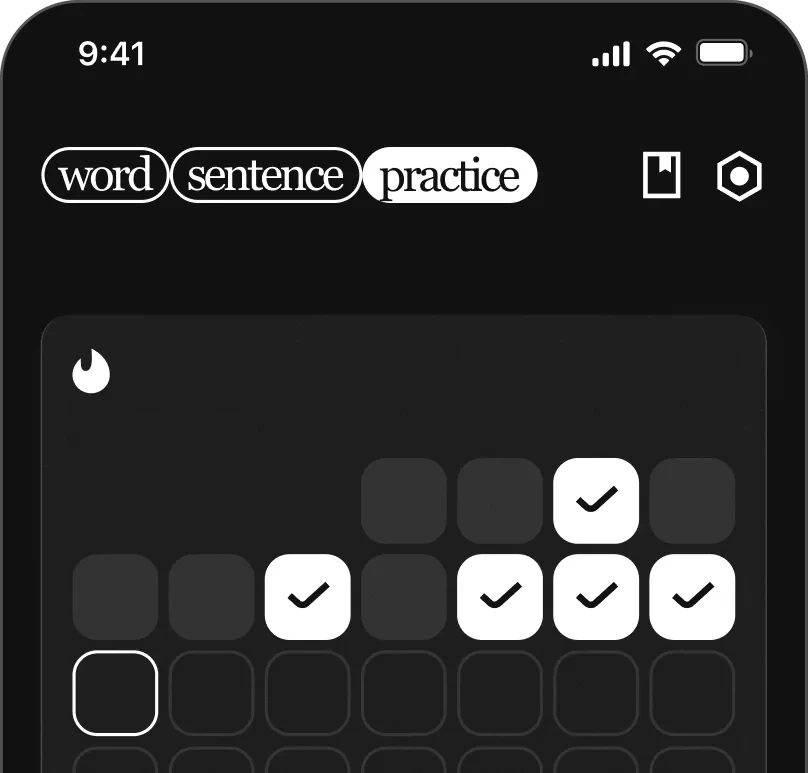
Save words and make them stick: practice brings each word back after 3, 7 and 30 days.
Estimates vary, but 1,000 to 2,000 of the most common words is usually enough for everyday conversation. wrd has 2,983 Chinese words and 1,472 phrases and idioms across three levels: beginner, intermediate and advanced. Every word comes with an English translation, a definition in Chinese and three example sentences.
Start with the beginner level: 人 (rén) “person,” 水 (shuǐ) “water,” and the verbs 吃 (chī) “to eat” and 喝 (hē) “to drink.” Every word comes with pinyin, the Latin spelling of Chinese, so you can read it from day one, and you can search the list in pinyin without tone marks: type shui to find 水. Learn each word together with its tone: 买 (mǎi) “to buy” and 卖 (mài) “to sell” differ only by tone. Characters in wrd are simplified, the standard in mainland China and Singapore. Then come back to them a few days later: wrd’s practice brings each word back after 3, 7 and 30 days.
Mandarin has four tones and a neutral one, and they change the meaning of a word. Said with a high flat tone, ma means “mother” (妈 mā); with a rising tone, “hemp” (麻 má); falling and rising, “horse” (马 mǎ); sharply falling, “to scold” (骂 mà). In English, pitch shows emotion; in Chinese it is part of the word. Pinyin marks the tone over the vowel, and the audio in wrd lets you hear it.
Install wrd and choose Chinese and your level. Then touch and hold your Lock Screen, tap Customize, choose the Lock Screen, tap the widget area and add wrd. The word updates on its own every day.
Yes, wrd is on Google Play. On Android, the word of the day shows up in a home screen widget.
Yes. The dictionary is built into the app, so the widget and word cards work without an internet connection.
One word a day is free. Premium adds up to 10 words a day, phrases and idioms, a sentence of the day with its own widget, a saved-words dictionary and practice.
Spanish, French, German, Italian, Portuguese (European and Brazilian), Chinese, Japanese, Korean, Arabic, Turkish, Russian and English. Your native language can be any of the 13.