





Korean words
for beginners
1,000 words and 500 phrases



Learn Korean words right from your lock screen. Every day wrd shows a new word with its English translation and examples. No lessons to schedule.
downloadtap the word
to see its definition
and two more examples




3,000 words and 1,463 phrases, beginner to advanced, all with translations
남자, 여자, 아이 등 모든 인간을 가리키는 말.
성별이 여성인 사람.
성별이 남성인 사람.
나이가 어린 사람.
태어난 지 얼마 되지 않은 아주 어린 아이.
부모, 자식, 형제처럼 한집에서 함께 사는 사람들.
어머니를 친근하게 부르는 말.
아버지를 친근하게 부르는 말.
나를 낳아 주신 여자 부모. '엄마'보다 정중한 말.
나를 낳아 주신 남자 부모. '아빠'보다 정중한 말.
남자가 자기보다 나이가 많은 남자 형제를 부르는 말.
남자가 자기보다 나이가 많은 여자 형제를 부르는 말.
여자가 자기보다 나이가 많은 남자 형제를 부르는 말.
여자가 자기보다 나이가 많은 여자 형제를 부르는 말.
자기보다 나이가 적은 형제나 자매.
부모가 낳은 남자 자식.
부모가 낳은 여자 자식.
아버지나 어머니의 어머니. 나이 많은 여자를 부르는 말로도 쓴다.
아버지나 어머니의 아버지. 나이 많은 남자를 부르는 말로도 쓴다.
가깝게 지내며 정을 나누는 사람.
학생을 가르치는 사람. 남을 높여 부르는 말로도 쓴다.
학교에 다니며 공부하는 사람.
아픈 사람을 진찰하고 병을 치료하는 사람.
병원에서 환자를 돌보고 의사를 돕는 사람.
사회의 질서를 지키고 범죄를 막는 일을 하는 사람.
식당 등에서 음식을 만드는 일을 하는 사람.
노래를 부르는 일을 직업으로 하는 사람.
영화나 연극에서 어떤 인물을 연기하는 사람.
자동차나 버스 등을 운전하는 일을 하는 사람.
회사에 다니며 일하는 사람.
곡식이나 채소를 기르는 일을 하는 사람.
나라를 지키기 위해 군대에서 일하는 사람.
어떤 물건이나 가게를 가진 사람. 손님을 맞이하는 사람.
가게를 찾아온 사람이나 집을 방문한 사람.
가까이 사는 사람이나 집.
다 자란 사람. 나이가 많은 사람.
결혼한 여자의 남자 배우자.
결혼한 남자의 여자 배우자.
아버지와 어머니를 함께 이르는 말.
부모가 낳은 아들과 딸.
사람이나 사물을 부르기 위해 붙인 말.
태어난 뒤로 살아온 햇수.
사람이 생각을 전하려고 입으로 내는 소리. 또는 한 나라의 언어.
어떤 사실이나 생각을 말로 전하는 것. 또는 줄거리가 있는 글.
모르는 것을 알기 위해 묻는 말.
질문이나 부름에 응하여 하는 말.
머릿속으로 헤아리거나 판단하는 것. 또는 그렇게 떠오른 내용.
사람이 느끼고 생각하는 속의 세계.
누군가나 무언가를 아끼고 소중히 여기는 따뜻한 마음.
그때그때 느끼는 마음의 상태.
잠을 잘 때 보는 것. 또는 이루고 싶은 바람.
다른 사람과 무엇을 하기로 미리 정하는 것.
사실이 아닌 것을 사실인 것처럼 꾸며서 하는 말.
남에게 알리지 않고 숨기는 일.
귀로 들을 수 있는 것.
사람이 말하거나 노래할 때 목에서 나오는 소리.
생각이나 사실을 적은 문장. 또는 글자.
글이나 그림을 인쇄하여 묶은 것.
안부나 소식을 적어 보내는 글.
연필이나 물감 등으로 그린 것.
사람이나 동물의 전체 형체.
사람이나 동물의 목 위 부분. 머리카락을 뜻하기도 한다.
눈, 코, 입이 있는 머리의 앞부분.
사물을 보는 감각 기관.
얼굴 가운데에 있어 냄새를 맡고 숨을 쉬는 기관.
음식을 먹고 말을 하는 얼굴의 기관.
소리를 듣는 감각 기관.
음식을 씹는, 입 안의 단단한 기관.
머리와 몸통을 잇는 부분. 목구멍을 뜻하기도 한다.
팔이 몸통에 이어지는 윗부분.
어깨에서 손목까지 이어지는 몸의 부분.
팔의 끝에 있어 물건을 잡는 부분.
손끝에 달린 다섯 개의 가늘고 긴 부분.
사람이나 동물이 서고 걷는 데 쓰는 몸의 부분.
다리의 끝에 있어 땅을 딛는 부분.
다리의 가운데에서 굽혀지는 부분.
사람이나 동물의 몸에서 가슴 아래 부분.
사람이나 동물의 몸에서 가슴과 배의 반대쪽 부분.
몸에서 목과 배 사이의 앞부분. 마음을 뜻하기도 한다.
몸의 겉을 싸고 있는 살갗.
사람이 먹고 마시는 모든 것.
쌀로 지은 끼니. 또는 끼니로 먹는 음식 전체.
강이나 비에 있는, 색과 냄새가 없는 마시는 액체.
밀가루를 반죽하여 구운 음식.
먹을 수 있는 동물의 살.
음식으로 먹는 물고기.
반찬으로 먹는 풀 종류의 식물.
나무나 풀에서 나는, 달고 물기가 많은 먹을거리.
둥글고 빨갛거나 푸른, 새콤달콤한 과일.
손의 안쪽 넓은 부분.
소에게서 짜낸 하얀 마실 것.
발의 아래쪽 바닥 부분.
찻잎을 우려낸 마실 것. 또는 사람이나 짐을 싣고 다니는 자동차.
마시면 취하게 되는 알코올이 든 음료.
음식을 달게 만드는 흰 가루.
음식에 짠맛을 내는 흰 알갱이.
닭이 낳은 알. 삶거나 부쳐서 먹는다.
배추나 무를 양념에 절여 발효시킨 한국의 매운 반찬.
고기나 채소를 넣고 끓인 국물 음식.
끓는 물에 면과 양념을 넣어 빨리 만들어 먹는 국수.
밥을 짓기 전의, 껍질을 벗긴 곡식 알갱이.
밀가루 등을 가늘고 길게 뽑아 만든 음식.
얇은 밀가루 피에 고기나 채소를 넣어 빚은 음식.
쌀가루를 쪄서 만든 쫄깃한 한국 전통 음식.
달거나 바삭한, 간식으로 먹는 가벼운 음식.
설탕으로 만든 작고 단단한 단것.
얼굴 양쪽의 볼 부분.
우유와 설탕을 얼려 만든 차갑고 단 음식.
다리에서 무릎 위의 굵은 부분.
보리로 만든, 거품이 나는 알코올 음료.
작고 둥근 알이 송이로 달리는 단 과일.
작고 빨간, 새콤달콤한 과일.
크고 둥글며 속이 빨갛고 물이 많은 여름 과일.
배 가운데에 있는 작은 자국.
땅속에서 자라는, 둥글고 갈색인 채소.
땅속에서 자라는, 길고 주황색인 채소.
둥글고 매운맛이 나는, 요리에 많이 쓰는 채소.
냄새가 강하고 매운, 양념으로 쓰는 채소.
맵고 빨갛거나 푸른, 양념으로 쓰는 채소.
음식을 튀기거나 볶을 때 쓰는, 물에 섞이지 않는 액체.
사람이 사는 건물. 가정.
집 안에서 벽으로 나뉜 하나의 공간.
드나들 때 열고 닫는, 벽에 난 부분.
빛과 바람이 드나들도록 벽에 낸 부분.
방이나 건물을 둘러싸 막는 부분.
방이나 건물에서 발로 딛는 아래쪽 면.
방의 위쪽을 막고 있는 면.
건물의 맨 위를 덮는 부분.
높낮이가 다른 곳을 오르내리도록 만든 층층의 단.
음식을 만드는 집 안의 공간.
손을 씻거나 용변을 보는 공간.
가족이 함께 모여 쉬는 집 안의 넓은 공간.
잠을 자는 방.
공부하거나 일할 때 앞에 놓고 쓰는 가구.
사람이 앉을 수 있게 만든 가구.
누워서 잠을 자도록 만든 가구.
음식을 차려 놓고 둘러앉아 먹는 탁자.
옷을 걸어 두는 물건.
옷을 넣어 두는 큰 가구.
얼굴이나 모습을 비추어 보는 물건.
몸에 입는 물건을 통틀어 이르는 말.
두 다리를 따로 넣어 입는 아래옷.
허리부터 아래로 둘러 입는, 다리가 나뉘지 않은 옷.
단추가 달린, 위에 입는 옷.
바닥에 앉을 때 까는 작은 깔개.
추울 때 옷 위에 입는, 길고 두꺼운 겉옷.
발에 신는, 신발 안에 받쳐 신는 옷.
걸을 때 발에 신는 물건.
머리에 쓰는 물건.
추위나 일을 위해 손에 끼는 물건.
눈을 잘 보이게 하려고 코와 귀에 거는 물건.
시간을 알려 주는 물건.
물건을 넣어 들거나 메고 다니는 물건.
돈이나 카드를 넣어 가지고 다니는 작은 물건.
비가 올 때 머리 위에 펴서 드는 물건.
손가락에 끼는 둥근 장신구.
목에 거는 장신구.
옷을 여미려고 다는 작고 둥근 물건.
옷에 달려 물건을 넣는 부분.
셔츠 깃에 매어 늘어뜨리는, 긴 천 장식.
땅 위로 끝없이 펼쳐진 공간.
낮에 빛과 열을 주는, 하늘에 뜨는 별.
밤에 하늘에서 빛나는, 지구를 도는 둥근 천체.
밤하늘에서 작게 반짝이는 빛.
하늘에 떠 있는, 작은 물방울이 모인 덩어리.
하늘에서 물방울이 되어 떨어지는 것.
비가 그친 뒤 하늘에 나타나는, 일곱 빛깔의 둥근 띠.
공기가 한 방향으로 움직이는 것.
그날그날의 비, 바람, 더위 같은 하늘의 상태.
땅이 높이 솟아오른 곳.
넓고 길게 흐르는 큰 물줄기.
소금물이 넓게 펼쳐진 곳.
줄기와 가지가 단단하고 오래 사는 식물.
식물에서 곱게 피어 향기가 나는 부분.
땅에서 자라는, 줄기가 부드러운 작은 식물.
땅에 있는 단단한 광물 덩어리.
땅을 이루는, 식물이 자라는 부드러운 물질.
물건이 타면서 내는 뜨거운 빛과 열.
물이 차가워져서 단단하게 굳은 것.
눈으로 사물을 볼 수 있게 하는 밝음.
스스로 움직이며 사는 생물을 통틀어 이르는 말.
집에서 기르며 사람을 잘 따르는 동물.
집에서 기르는, 조용하고 날쌘 동물.
날개가 있어 하늘을 나는 동물.
물속에서 헤엄치며 사는 동물.
농촌에서 기르는, 크고 힘이 센 가축.
고기를 얻으려고 기르는, 살이 통통한 가축.
알과 고기를 얻으려고 기르는 새.
물에서 헤엄치며 부리가 납작한, 집에서도 기르는 새.
털과 고기를 얻으려고 기르는, 온순한 가축.
줄무늬가 있고 힘이 센, 큰 산짐승.
몸집이 크고 털이 많은, 힘센 산짐승.
귀가 길고 빨리 뛰는, 작고 귀여운 동물.
몸이 작고 꼬리가 긴, 빠르게 움직이는 동물.
다리가 없이 길게 기어 다니는 동물.
작고 다리가 여럿 달린 동물을 흔히 이르는 말.
넓고 고운 날개로 꽃 사이를 나는 곤충.
땅에 무리 지어 사는, 부지런한 작은 곤충.
다리가 여덟 개이고 줄을 쳐서 벌레를 잡는 동물.
몸이 셋으로 나뉘고 다리가 여섯 개인 작은 동물.
어떤 일이 일어나거나 이어지는 동안. 또는 하루를 스물넷으로 나눈 단위.
아침부터 밤까지의 한 날.
지금 지나가고 있는 이 날.
오늘의 바로 앞날.
오늘의 바로 다음 날.
날이 밝은 뒤 이른 때. 또는 그때 먹는 끼니.
한낮. 또는 그때 먹는 끼니.
해가 질 무렵. 또는 그때 먹는 끼니.
해가 진 뒤 다시 날이 밝기 전까지의 어두운 동안.
해가 떠 있는 밝은 동안.
날이 밝아 오기 직전의 이른 때.
말하고 있는 바로 이때.
한 주의 끝인 토요일과 일요일.
월, 화, 수처럼 한 주를 이루는 각 날.
겨울 다음에 오는, 날이 따뜻해지는 철.
봄 다음에 오는, 가장 더운 철.
여름 다음에 오는, 잎이 물들고 서늘해지는 철.
가을 다음에 오는, 가장 추운 철.
지금 지나고 있는 이 해.
올해의 바로 다음 해.
수를 셀 때 가장 처음인 수. 1.
하나에 하나를 더한 수. 2.
둘에 하나를 더한 수. 3.
셋에 하나를 더한 수. 4.
넷에 하나를 더한 수. 5.
다섯에 하나를 더한 수. 6.
여섯에 하나를 더한 수. 7.
일곱에 하나를 더한 수. 8.
여덟에 하나를 더한 수. 9.
아홉에 하나를 더한 수. 10.
열의 열 배가 되는 수. 100.
백의 열 배가 되는 수. 1000.
천의 열 배가 되는 수. 10000.
수를 나타내는 글자나 기호.
차례를 나타내려고 붙인 수.
전체를 똑같이 둘로 나눈 것 중 하나.
하나도 빠짐없는 모든 것.
빠짐없이 다. 또는 사람이나 사물 전체.
적은 정도나 양. 또는 짧은 동안.
전체를 이루는 여러 조각 가운데 하나.
학생이 모여 공부하는 곳.
아픈 사람을 치료해 주는 곳.
물건을 늘어놓고 파는 작은 집.
여러 가게가 모여 물건을 사고파는 곳.
돈을 내고 음식을 사 먹는 곳.
무엇을 담아 두는, 배가 불룩한 그릇.
돈을 맡기거나 빌리고 찾는 곳.
사람들이 쉬고 거닐 수 있게 만든 넓은 곳.
책을 모아 두고 읽거나 빌려 주는 곳.
편지나 소포를 부치고 받는 곳.
약을 지어 주거나 파는 곳.
기독교를 믿는 사람들이 모여 기도하는 곳.
기차나 지하철이 멈춰 사람이 타고 내리는 곳.
비행기가 뜨고 내리는 곳.
사람들이 모여 함께 일하며 돈을 버는 조직이나 그 건물.
영화를 보거나 연극을 공연하는 곳.
손톱이나 뾰족한 것으로 겉을 문지르다
옛 물건이나 귀한 것을 모아 보여 주는 곳.
사람이 많이 모여 사는, 크고 번화한 곳.
도시에서 멀리 떨어진, 논밭이 많은 한적한 곳.
엔진으로 바퀴를 굴려 사람을 태우고 달리는 탈것.
손이나 물건으로 가볍게 여러 번 치다
땅속 길로 다니는 전철.
여러 칸을 이어 철길 위를 달리는 큰 탈것.
액체나 가루가 고르게 섞이도록 돌리다
날개로 하늘을 날아 사람이나 짐을 나르는 탈것.
발로 페달을 밟아 두 바퀴를 굴려 타는 탈것.
엔진이 달린 두 바퀴 탈것.
짐을 싣고 나르는 큰 차.
사람이나 차가 다니도록 난 곳.
차가 다니도록 넓게 닦아 놓은 길.
색깔 불빛으로 차와 사람의 길을 알려 주는 장치.
버스 같은 차가 멈춰 사람이 타고 내리는 곳.
차를 세워 두는 곳.
타거나 들어갈 수 있음을 보여 주는 작은 종이.
차를 움직여 모는 일.
다른 곳으로 떠나 두루 다니며 구경하는 일.
땅의 모습을 줄여서 그린 그림.
들거나 실어 나르는 물건.
집과 건물 사이로 사람과 차가 다니는 길. 또는 두 곳 사이의 떨어진 정도.
일정한 모양을 갖춘, 손으로 다룰 수 있는 것.
물건을 사고팔 때 값으로 주고받는 것.
글을 쓰거나 무엇을 싸는 데 쓰는 얇은 것.
나무 속에 심을 넣어 글씨를 쓰는 도구.
잉크로 글씨를 쓰는 도구.
두 날을 엇갈리게 해서 종이나 천을 자르는 도구.
물건을 베거나 자르는 데 쓰는 날이 선 도구.
국이나 밥을 떠먹는 도구.
두 개를 한 손에 쥐고 음식을 집어 먹는 도구.
음식을 담는 속이 우묵한 물건.
음식을 담는 납작한 그릇.
물이나 차를 따라 마시는 그릇.
음식을 끓이거나 삶는 데 쓰는 그릇.
자물쇠를 열고 잠그는 데 쓰는 물건.
편지를 부칠 때 값을 치렀다는 표로 붙이는 작은 종이.
편지나 물건을 넣어 봉하는 종이 주머니.
물건을 넣어 두는 네모난 통.
물에 풀어 때를 씻어 내는 데 쓰는 물건.
물기를 닦는 데 쓰는 천.
이를 닦는 데 쓰는, 솔이 달린 도구.
기뻐서 얼굴을 펴고 소리를 내거나 표정을 짓다.
생김새가 곱고 보기에 좋다.
삶에 만족하여 즐겁고 기쁘다.
삶에서 충분히 만족하고 기쁜 상태.
물로 둘러싸인 땅.
나무가 많이 우거진 곳.
가사에 가락을 붙여 목소리로 부르는 것.
소리로 만든, 듣기 좋은 노래나 연주.
Not in the list yet. Try Korean or English, like “mul” or “water.”
Saved words come back
for review after 3, 7 and 30 days
3,000 words, 1,463 phrases and idioms.
Every word has an English translation,
a definition in Korean and three examples.
Learn Korean from English. Choose beginner, intermediate or advanced, and switch any time.
On iPhone, add it to the Lock Screen: touch and hold the Lock Screen, tap Customize, then Lock Screen, and add wrd. On Android, add it to your home screen.
A new word with its translation every day. Tap the widget to open a card with the definition, examples and audio.
No lessons, no reminders: the word shows up where you already look dozens of times a day.
One word a day is free.
Premium unlocks the rest.
Three sizes for the iPhone Lock Screen and three for the Home Screen. On Android, a home screen widget.
The widget shows the English translation or a definition in Korean. Pick whichever works for you in settings.
Words rotate
from 6 a.m. to midnight.

1,463 Korean expressions, from 잘 먹겠습니다 to 발이 넓다.
A separate widget with a new Korean sentence and its translation every day.
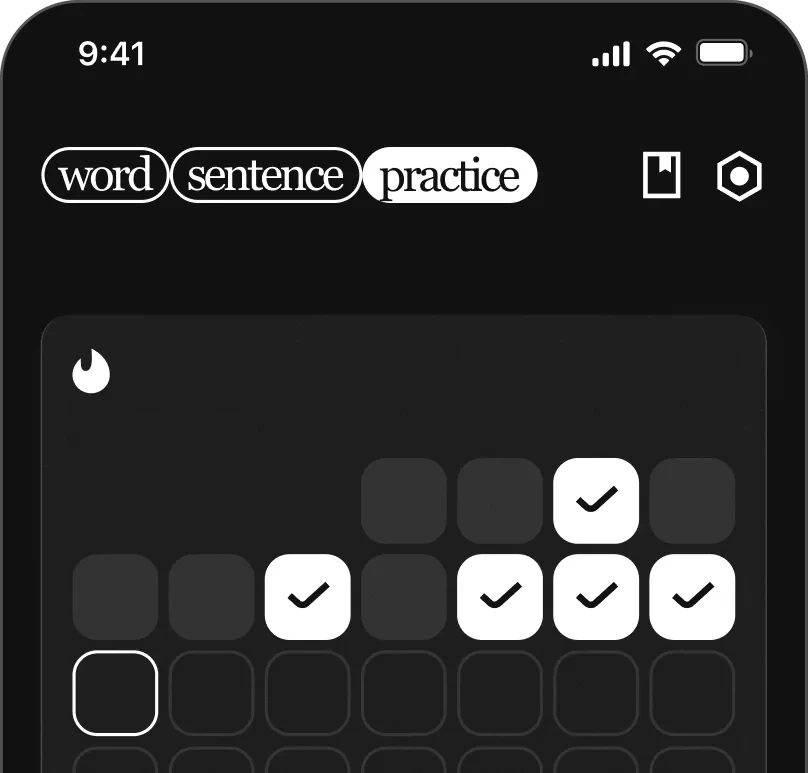
Save words and make them stick: practice brings each word back after 3, 7 and 30 days.
Estimates vary, but 1,000 to 2,000 of the most common words is usually enough for everyday conversation. wrd has 3,000 Korean words and 1,463 phrases and idioms across three levels: beginner, intermediate and advanced. Every word comes with an English translation, a definition in Korean and three example sentences.
Start with the beginner level: 사람 “person,” 물 “water,” and the verbs 가다 “to go,” 먹다 “to eat” and 마시다 “to drink.” Verbs in the list are in their dictionary form ending in -다; in everyday polite speech the ending changes, so 먹다 becomes 먹어요, “I eat.” A few words you already know from English: 컵 is cup, 셔츠 is shirt, 아이스크림 is ice cream. You can also search the list in romanized Korean: type mul to find 물. Then come back to them a few days later: wrd’s practice brings each word back after 3, 7 and 30 days.
Most learners can read it within a few days to two weeks. Hangul has 24 basic letters, 14 consonants and 10 vowels, and they stack into syllable blocks: ㅅ + ㅏ + ㅁ = 삼. The shapes of the consonants even hint at how they are pronounced. Every word in wrd is written in Hangul, and the audio lets you check your reading.
Install wrd and choose Korean and your level. Then touch and hold your Lock Screen, tap Customize, choose the Lock Screen, tap the widget area and add wrd. The word updates on its own every day.
Yes, wrd is on Google Play. On Android, the word of the day shows up in a home screen widget.
Yes. The dictionary is built into the app, so the widget and word cards work without an internet connection.
One word a day is free. Premium adds up to 10 words a day, phrases and idioms, a sentence of the day with its own widget, a saved-words dictionary and practice.
Spanish, French, German, Italian, Portuguese (European and Brazilian), Chinese, Japanese, Korean, Arabic, Turkish, Russian and English. Your native language can be any of the 13.